Showing posts with label HTML. Show all posts

Monday, May 3, 2021

RUNNING EXTERNAL FILES IN JAVASCRIPTS


GLSW4E BOOKS FACEBOOK  W4E INSTAGRAM W4E YOUTUBEW4E HOME
FOLLOW US


In this sections, we will learn how to run a script (as an external file) from another JavaScript file. 


Before we start, let us see more examples on adding script to html:
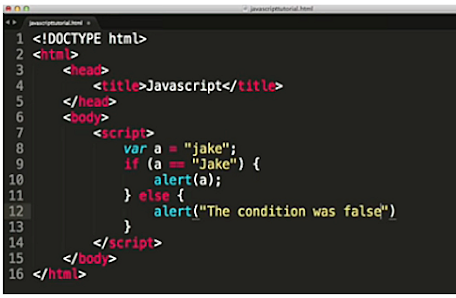
RUNNING EXTERNAL FILES IN JAVASCRIPTS-GLS


Another example

RUNNING EXTERNAL FILES IN JAVASCRIPTS--GLS


Now lets see how we can run a script from another html/JavaScript file.


--------Create external JavaScript file with the extension .js.

--------After creating, add it to the HTML file in the script tag.

--------The src attribute is used to include that external JavaScript file.

---------If you have more than one external JavaScript file, then add it in the same web page to increase performance of the page.

•Example:

•Let’s say you created the following new.js external JavaScript file:

RUNNING EXTERNAL FILES IN JAVASCRIPTS

 Now add the external JavaScript file to the HTML web page:
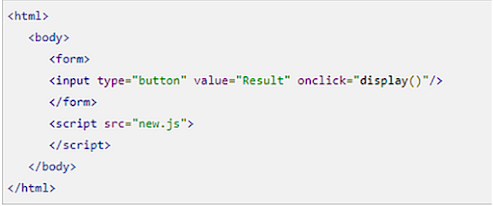
RUNNING EXTERNAL FILES IN JAVASCRIPTS


So that is how to call one script from another. Next, we will look at the types of DATA YPES that are supported n JavaScript.


CONTINUE READING - SUPPORTED DATA TYPES IN JAVASCRIPTS


Watch Video


Sunday, May 2, 2021

INTRODUCTION TO JAVASCRIPT


GLSW4E BOOKS FACEBOOK  W4E INSTAGRAM W4E YOUTUBEW4E HOME
FOLLOW US

****JAVASCRIPT AND HTML ELEMENT****

GO TO GLS PYTHON COURSES


JavaScript is a very powerful scripting language, used mainly for enhancing user's interaction with a web page. You can make your web page interactive and livelier, with the help of JavaScript. JavaScript is also widely used in game development and Mobile application development.

JavaScript cannot run on its own, because it is a scripting language, rather, browsers are used for running the code. When you request an HTML page with JavaScript in it, the script is sent to the browser and executed by the browser.

You will need a text editor to write your code and a browser to display the web pages you develop. Any text editor of your choice can be used including Notepad++, Visual Studio Code, Sublime Text, Atom, or any other text editor you are comfortable with.


For browsers, any web browser including Google Chrome, Firefox, Microsoft Edge, Internet Explorer etc. can run JavaScript.


.

•HTML tag

•An HTML tag is just an opening or closing entity. For example:

•<p> and </p>

•HTML element encompasses opening tag, closing tag, content (optional for content-less tags) Eg:

•<p>This is the content</p>


•JAVASCRIPT PROVIDES THE SCRIPT

•HTML Elements

HTML elements are individual component of an HTML document or web page, composed of a tree of HTML nodes, such as text nodes. Each node can have HTML attributes specified.


The Nodes can also have content, including other nodes and text.


CONTINUE READING - SIMPLE JAVASCRIPT CODE


Watch Video


MORE JAVASCRIPT ARTICLES FROM GLS BELOW